Tailored trim: Full control over all four board sides
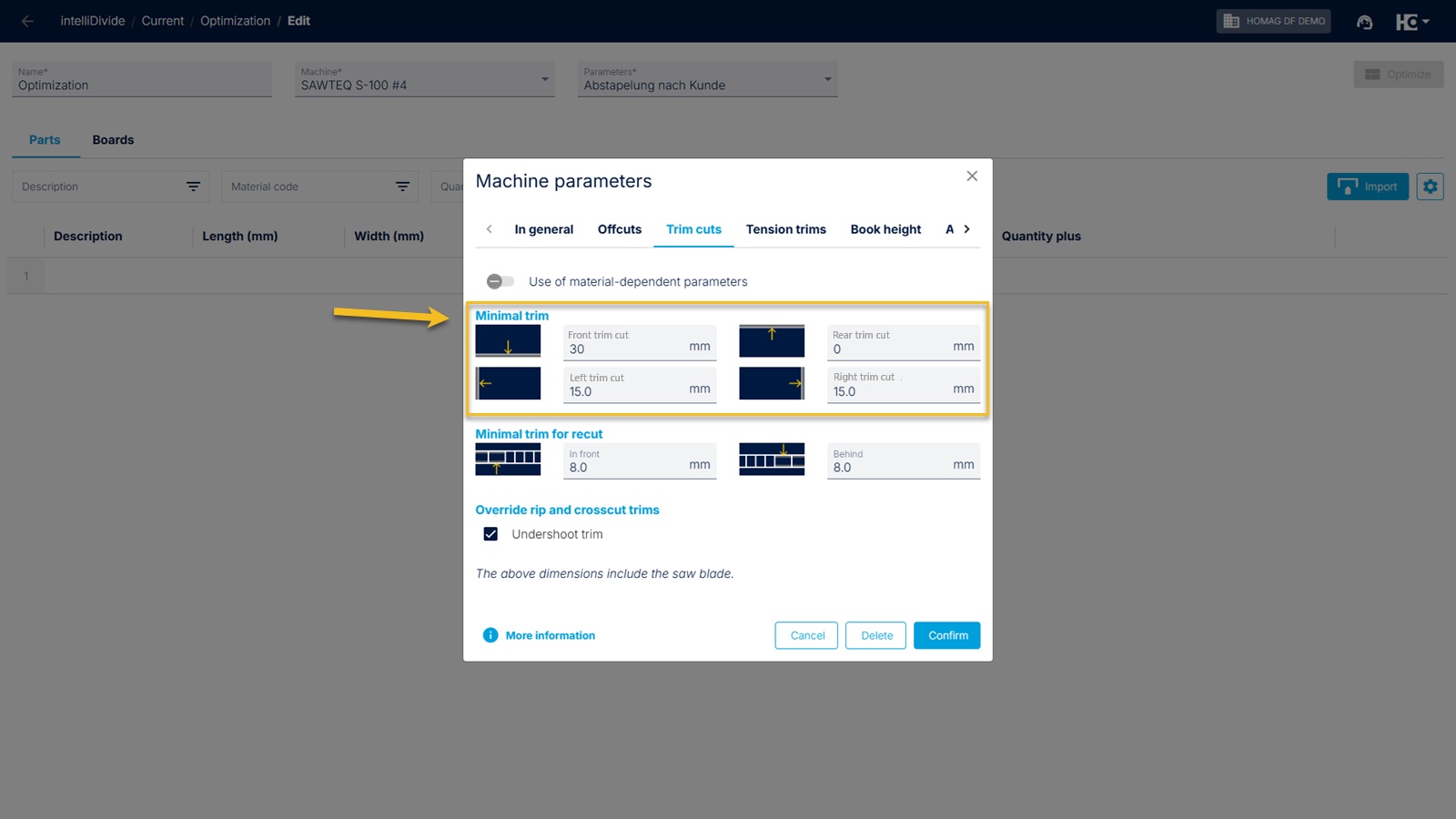
The trim dimension can now be defined separately for each side.
Previously, intelliDivide only offered a single, uniform trim dimension for the entire board. This kept operation simple.
Reality at the saw is sometimes different. Two typical examples from your daily work showed us that a single setting isn't always enough:
The "Forklift Effect": The front edge of a raw board is often more stressed or damaged due to transport. Here, you need a larger trim at the front (e.g., 30 mm) to guarantee clean edges. A uniformly large trim all around would only waste material unnecessarily on the remaining three sides.
Finished edges (e.g., kitchen worktops): Some boards already come from the factory with a finished edge (postforming). Nothing must be cut away here! The trim dimension on this side must be strictly set to "0", while the other sides are trimmed normally.
The update: To meet these requirements, you can now define the trim cut separately for each side: Front, Back, Left, and Right.
Important note on settings: As a first step, you will find these four separate fields in the machine settings. This means the values initially apply to the selected machine.
However, we are already working on making this function available to you directly per material very soon.
.
Back to List